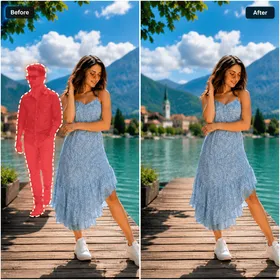
Tentang AI Object Remover
AI Object Remover adalah aplikasi fotografi dari Zentavo Softworks yang berfokus pada satu tugas praktis: menghilangkan elemen yang tidak diinginkan dari foto Anda, sehingga hasil akhirnya tetap sesuai yang Anda inginkan. Rilis terkini adalah versi 1.5, diterbitkan dengan nama paket com.radhedevelopers.aiobjectremover, dan tersedia sebagai unduhan ringan sebesar 23.2 MB.
Dibangun Sekitar Satu Tugas Jelas Di mana banyak editor foto menyembunyikan fungsi berguna di balik berlapis-lapis menu, aplikasi ini menempatkan alat penghapus objek sebagai inti pengalaman penggunaannya. Anda membuka aplikasi, bekerja pada gambar di depan Anda, dan menghilangkan gangguan yang merusak komposisi, entah itu pejalan kaki yang kebetulan lewat, benda asing, atau elemen yang seharusnya tidak ada di dalam bingkai. Hasilnya adalah foto yang lebih bersih tanpa perlu suite editing desktop lengkap.
Alat Fotografi yang Fokus Sebagai aplikasi fotografi, aplikasi ini melengkapi kamera dan galeri yang sudah Anda miliki, bukan menggantikannya. Alih-alih membentuk ulang atau mengubah gaya gambar, aplikasi ini berfokus pada pembersihan korektif, yang biasanya menjadi langkah yang dicari orang setelah foto sudah diambil. Tujuan yang sempit itu membuat alur kerja tetap singkat dan aplikasi mudah digunakan oleh siapa pun yang sekadar ingin foto mereka dirapikan.
Kebutuhan Perangkat dan Ukuran Build ini memerlukan Android 7.0 atau lebih baru, jadi jika Anda menjalankan versi sistem yang lebih lama, Anda perlu memperbarui sistem terlebih dahulu, sementara perangkat yang lebih baru seharusnya tidak kesulitan memenuhi syarat tersebut. Instalasi membutuhkan ruang untuk paket 23.2 MB ditambah ruang yang digunakan gambar yang Anda edit, sehingga aplikasi tetap nyaman bahkan pada perangkat dengan penyimpanan internal terbatas.
Informasi Build Terkini Versi 1.5 adalah rilis yang tercantum di sini, bertanggal 2026-09-25, dan dirilis atas nama pengembang Zentavo Softworks. Daftar ini tidak menyertakan rating konten, sehingga informasi tersebut tetap tidak ditentukan bagi siapa pun yang ingin mengeceknya sebelum menginstal.
Informasi APK
- Versi
- 1.5
- Ukuran
- 23.2 MB
- Android
- 7.0+
- Jenis berkas
- APK
- Diperbarui
- 25 Sep 2026
- Paket
- com.radhedevelopers.aiobjectremover
- Pengembang
- Zentavo Softworks
Fitur
Penghapusan Objek
Pembersihan Foto
Alat Fotografi
Aplikasi Ringan
Pertanyaan umum
Which Android versions can run AI Object Remover?
The build requires Android 7.0 or newer. If your device is running an older system release, you would need to update before installing. Devices already on that requirement or on a more recent system should be able to run the app normally, and newer devices in general are well within the stated compatibility range.
How much storage do I need for this app?
The package for AI Object Remover is 23.2 MB, so that is the space the installation itself occupies. On top of that, you should leave room for the images you open and save, since edited photos are written to your device storage. Overall the footprint stays small compared with most photography apps.
What version is current and when was it released?
The latest version listed is 1.5, dated 2026-09-25. It is published by Zentavo Softworks under the package name com.radhedevelopers.aiobjectremover. Checking that you have this build installed is the simplest way to confirm you are running the most recent release shown in this listing.
What does AI Object Remover actually do?
It is a photography app dedicated to removing unwanted elements from your pictures, cleaning up the frame so the subject reads clearly without distracting objects or people in the background. The focus is on corrective cleanup rather than a broad set of filters or effects, which keeps the workflow short and direct.
Do I need to know the package name to install it?
You do not need to type it yourself, but it identifies the app on your device. The package for AI Object Remover is com.radhedevelopers.aiobjectremover, and that identifier is what the system records after installation, allowing you to confirm the correct app is present alongside your other photography tools.